Brought to you by Michael and Brian - take a Talk Python course or get Brian's pytest book

#457: Tapping into HTTP

Published Tue, Nov 11, 2025, recorded Tue, Nov 11, 2025
0:00
00:28:01
Watch this episode on YouTube
Play on YouTube
Watch the live stream replay

About the show

Sponsored by us! Support our work through:

Connect with the hosts

Join us on YouTube at pythonbytes.fm/live to be part of the audience. Usually Monday at 10am PT. Older video versions available there too.

Finally, if you want an artisanal, hand-crafted digest of every week of the show notes in email form? Add your name and email to our friends of the show list, we'll never share it.

Michael #1: httptap

  • Rich-powered CLI that breaks each HTTP request into DNS, connect, TLS, wait, and transfer phases with waterfall timelines, compact summaries, or metrics-only output.
  • Features
    • Phase-by-phase timing – precise measurements built from httpcore trace hooks (with sane fallbacks when metal-level data is unavailable).
    • All HTTP methods – GET, POST, PUT, PATCH, DELETE, HEAD, OPTIONS with request body support.
    • Request body support – send JSON, XML, or any data inline or from file with automatic Content-Type detection.
    • IPv4/IPv6 aware – the resolver and TLS inspector report both the address and its family.
    • TLS insights – certificate CN, expiry countdown, cipher suite, and protocol version are captured automatically.
    • Multiple output modes – rich waterfall view, compact single-line summaries, or -metrics-only for scripting.
    • JSON export – persist full step data (including redirect chains) for later processing.
    • Extensible – clean Protocol interfaces for DNS, TLS, timing, visualization, and export so you can plug in custom behavior.
  • Example:

img

Brian #2: 10 Smart Performance Hacks For Faster Python Code

  • Dido Grigorov
  • A few from the list
    • Use math functions instead of operators
    • Avoid exception handling in hot loops
    • Use itertools for combinatorial operations - huge speedup
    • Use bisect for sorted list operations - huge speedup

Michael #3: FastRTC

  • The Real-Time Communication Library for Python: Turn any python function into a real-time audio and video stream over WebRTC or WebSockets.
  • Features
    • 🗣️ Automatic Voice Detection and Turn Taking built-in, only worry about the logic for responding to the user.
    • 💻 Automatic UI - Use the .ui.launch() method to launch the webRTC-enabled built-in Gradio UI.
    • 🔌 Automatic WebRTC Support - Use the .mount(app) method to mount the stream on a FastAPI app and get a webRTC endpoint for your own frontend!
    • ⚡️ Websocket Support - Use the .mount(app) method to mount the stream on a FastAPI app and get a websocket endpoint for your own frontend!
    • 📞 Automatic Telephone Support - Use the fastphone() method of the stream to launch the application and get a free temporary phone number!
    • 🤖 Completely customizable backend - A Stream can easily be mounted on a FastAPI app so you can easily extend it to fit your production application. See the Talk To Claude demo for an example of how to serve a custom JS frontend.

Brian #4: Explore Python dependencies with pipdeptree and uv pip tree

  • Suggested by Nicholas Carsner
  • **pipdeptree**
    • Use pipdeptree --python auto to allow it to read your venv
  • uv pip tree
    • Also check out uv pip tree and some useful flags
      • --show-version-specifiers to show the rules
      • --outdated notes packages that need updated

Extras

Brian:

Joke: Sure Grandma

Episode Transcript

Collapse transcript

00:00 Hello and welcome to Python Bytes, where we deliver Python news and headlines directly to your earbuds.

00:05 This is episode 457, and it's being recorded on November 11th, 2025.

00:11 And I'm Brian Okken.

00:12 And I'm Michael Kennedy.

00:14 Wow, nowhere. Oh, it's 11-11. It's corduroy day. I totally forgot to wear corduroy today.

00:20 I love it. Is that because the vertical stripes?

00:22 Yeah, yeah.

00:23 Vertical grooves.

00:23 Yeah, yeah. I love it. I have no corduroy on either. We missed the opportunity.

00:28 some stripes on your, it's not corduroy, but your sweater.

00:32 Yeah, almost a sweater, almost pulled it off.

00:34 Anyway, we'd like to thank everybody that supports us through going to

00:40 doing Talk Python training or the pytest course, Patreon supporters or people that have bought our books.

00:47 We really, really appreciate all of the support and it keeps us going.

00:51 Also love to hear from people on Bluesky, on Mastodon and through email.

00:57 So you can go to the contact us on pythonbytes.fm.

01:02 And there's the links to all the Bluesky Mastermind, all those things to get all of us.

01:07 We actually have a couple items today from listeners.

01:10 So feel free to send us things.

01:13 If you'd like to join the show live, and even if it's on a weird time like this week,

01:19 you can find out when it's going to happen next by going to pythonbytes.fm/live.

01:24 And, you know, jump on and talk with us while we're recording.

01:28 It's fun.

01:29 Also, you don't need to take notes because we're going to send you all the links.

01:34 Well, they're in the show notes, but we'll also send them directly to your inbox if you

01:38 sign up to be a friend of the show and go to pythonbytes.fm and sign up for the newsletter.

01:45 I think that's all of the stuff.

01:47 So let's jump into the first item, Michael.

01:50 Let's talk about it now.

01:52 I want to talk about something called HTTP tap at HTTP tap.dev. Now this one, it's a little bit

02:01 like HTTP pi, HTTP pi, I don't know how you really pronounce that correctly, which is my go to

02:08 anytime I need to test something on the terminal or that sort of thing. HTTP pi is because, you know,

02:15 it's like curl or whatever, but it gives you lots more stats, gives you more information. And this,

02:20 This is a little bit like that.

02:21 If you wanted to go into, say, your Chrome DevTools or something

02:25 and say, "Hey, I'm requesting this page or this URL or this API endpoint.

02:30 It's a little bit slow.

02:31 It's a little bit funky.

02:32 What's going on?

02:33 Where's the problem?" - Yeah. - If it's getting hung up,

02:35 is it connecting to the server or is it the backend app server, like Grinny

02:41 and whoever is not responding?

02:42 So that's what this is all about.

02:45 And it's built, I believe it's built with rich or textual.

02:48 I can't remember how far down the Will McGugan train it goes,

02:52 but it definitely is built on some of those.

02:54 Built with Python, although that's not necessarily that important, right?

02:58 It's just I guess it's easier to make improvements to,

03:00 but it's more just a tool that anyone doing web stuff

03:03 with Python might be interested in.

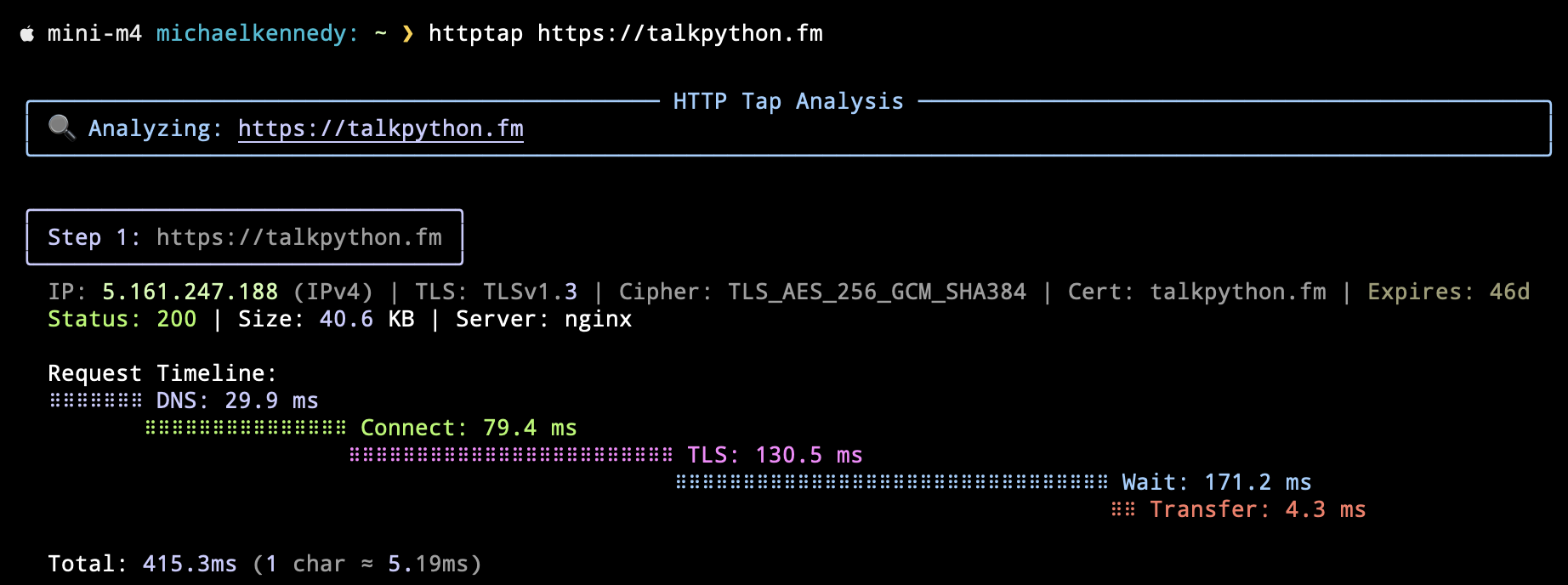
03:06 And I pulled up a little example of just asking Talk Python,

03:10 acptptap, then talkpython.fm, and it says, here's the analysis.

03:13 And apparently there's only one step, maybe if there were redirects or something,

03:16 It would show multi-stage flows, but there's no redirects, so there's not.

03:22 It shows you the IP address, the TLS version, the cipher,

03:25 when the certificate expires, the status, the size, the server.

03:30 It gets all of that stuff right, which is pretty cool.

03:33 Then it has this waterfall-tiered sort of diagram.

03:36 It says the request timeline.

03:38 It took 29 milliseconds for DNS to figure out where the heck that was.

03:42 I've been on vacation. I haven't been going to the website.

03:45 So I had to go get it from the internet.

03:47 And then it took 80 milliseconds to connect to the server.

03:50 By the way, it's about 80 milliseconds ping time.

03:53 So you got to keep that in mind when all these numbers, right?

03:55 Like that's East Coast, West Coast, US, 2,500 miles.

03:59 So connect 80 milliseconds.

04:02 TLS took 130 milliseconds.

04:05 So if you ever see your browser doing like keep alive type of stuff,

04:09 that's a big savings right there.

04:10 That's almost 200 milliseconds savings if it doesn't have to keep doing that over and over, right?

04:15 So that's pretty nice.

04:15 And then you can see it's actually sending the request and waiting for the response.

04:21 So it goes out, comes back, takes 170 milliseconds.

04:25 Again, ping time in there as well.

04:27 And then the transfer is a whopping 4.3 milliseconds.

04:31 So this is pretty cool.

04:32 A really quick view of just seeing what's going on, right, Brian?

04:34 Yeah, actually, I love that.

04:37 Very useful, especially if you've got some lag issues or some part of your website that's a little slow.

04:44 you can look at what's going on.

04:46 Is it DNS?

04:48 Is it the transfer?

04:50 Where's this delay coming from?

04:51 I mean, it's not super fine-grained, but this is pretty good.

04:54 Yeah, well, there's just, yeah, for sure.

04:56 And there's a lot of stuff involved, right?

04:57 There's, like you said, the DNS might be taking forever,

05:00 which could be part of the problem, or who knows, right?

05:02 There's just a lot of things.

05:04 So really neat to see this little UI built in Python.

05:09 Yeah, and I guess we have to say it.

05:12 It's always DNS.

05:13 It's always DNS.

05:14 I mean, that's...

05:16 It's not always DNS, but yeah.

05:18 Anyway.

05:19 Yeah, but often.

05:20 Often.

05:21 No, I think this is great.

05:23 This is cool.

05:24 I've got actually some side projects that I've got some weird speed issues,

05:30 and I don't know why.

05:31 And even just looking at some of this stuff, help out to figure out where to start debugging.

05:36 Yeah, you can get some of these types of things in the dev tools and browsers,

05:41 but this is really nice.

05:42 It's visual, it's colorful, it's graphical.

05:44 I love it.

05:44 I like it.

05:44 And it's command line.

05:46 Yay, we love command line.

05:47 Yay.

05:48 Okay.

05:50 I'm not usually, I have to admit, I click on listicles all the time.

05:55 But we don't cover very many listicles on the show, but I'm going to cover one today.

06:01 I actually, oh, my aspect ratio is off.

06:04 There we go.

06:05 Here we go.

06:07 This is from PyCharm.

06:08 It's actually from Evgenia Verbena.

06:12 That's a cool name.

06:13 10 smart performance hacks for faster Python code.

06:19 And there's some that, well, actually, I think stuff like this is really good to talk to people about

06:26 because we don't really think about performance too much.

06:28 I mean, when you're starting Python, you don't think about it too much.

06:32 It's hopefully, you know, hopefully you don't.

06:34 There's, we don't want people to prematurely optimize.

06:37 But there's just some habits that maybe are decent to get into that avoid problems later on.

06:44 And so that's one of the reasons why I like going through this.

06:48 Oh, nice menu on the right side, also with all the hacks on the right.

06:53 Anyway, the first one, not too surprising if you've done through any leak code stuff or whatever,

07:00 is leverage set for membership testing.

07:04 So if you've got a big list, you can throw the list into a set,

07:08 and then you can find out easily if something's in the list by putting it in a set.

07:14 And oddly, that speeds things up quite a bit, like drastically.

07:20 List lookup versus set lookup is super fast.

07:24 Same predictionaries, too.

07:26 If you're looking up by some kind of key, either one, it's ridiculous.

07:30 Yeah.

07:32 Like I said, some not too surprising.

07:34 Slots are great if you're going to use classes or data classes even.

07:39 If it's not going to grow over time, you can define slots and stuff.

07:44 And then the lookup for each element within a data class is a lot faster with slots.

07:52 I want to jump around because there were some that I didn't really realize

07:56 or I just didn't think about before.

07:59 And one of them is use math functions instead of operators.

08:01 and I guess I wouldn't some of these are weird

08:06 so math.square sqrt for square root is faster and more accurate

08:12 than raising a number to the power of 0.5 using

08:16 exponentation operator I wouldn't do that anyway because that's weird

08:20 it just looks weird I don't know, bad code style

08:24 but there's a whole bunch of others similarly the sine function exponent

08:28 log, those are really fast operators in math so go ahead and utilize math and uh so that's a good pointer pre-allocate memory

08:36 with known sizes now this is some like an old trick that i think that i didn't really think

08:41 that it was a huge difference and it looks like one of the things that's it's cool in this article

08:45 it does the pre-allocated time versus or the uh before and after times so there's a bit of

08:51 you know uh 0.01 second speed up um but so the trick is just to uh i guess have an array with

08:59 If you're going to fill an array anyway, may as well just fill it with some zeros or something initially.

09:05 And then it seems like a waste of time to fill it with zeros

09:09 because you're going to fill everything up.

09:11 But it isn't because it's the allocation that takes a little bit longer

09:14 than the filling it with zeros.

09:16 Yeah, and Brian, it's worth thinking through how that goes a little bit

09:20 because if you just go append, append, append, and this is something I don't do and it's inspiring me to consider,

09:25 well, maybe I should.

09:26 But the array doesn't know if you're going to put a million items in there.

09:30 Every time you do like a array.append or list.append, it doesn't go, guess what?

09:35 We're going to add a million, right?

09:35 It's like, well, what about 16?

09:37 What about 32 of them?

09:39 Oh, now we need more.

09:40 Okay, what about 64 of them?

09:41 You know, it just, it has to keep reallocating and copying as you build this up.

09:45 So, yeah.

09:46 And I don't remember how, I mean, it's a little smarter than that.

09:49 So I think it like does, like doubles it in size or takes a chunk.

09:53 I can't remember what it does.

09:54 Yeah, it's not allocating every one, right?

09:56 It's got an awkward.

09:56 Right.

09:57 Or heuristic.

09:57 But if you already know how big it's going to be, you can just tell it to do it once, which is cool.

10:03 But I don't really think about that too much.

10:06 A couple of the ones down below I really wanted to cover.

10:09 This was avoid exception handling and hot loops.

10:13 And I am guilty of this too, because I try to have my exception handling

10:17 as close to the place where it can go wrong as possible.

10:21 Just as it's a visual thing and a code readability thing to have this tight.

10:26 have the try right around it.

10:28 Like the example has a zero division error, has the try and accept right there.

10:34 However, that might slow down a little bit.

10:38 And it did, in this case, was the try and accept on this one.

10:42 It's just not there.

10:43 I think the top one versus the bottom one.

10:44 Yeah, but there's no try and accept at the top.

10:46 That's the baseline.

10:48 Oh, okay.

10:48 The conditional check versus.

10:51 It's like checking for the condition that would cause the exception to avoid the exception.

10:55 Oh, OK.

10:57 I guess I would just put the try and accept at the top or around the larger one as a better comparison.

11:03 Anyway.

11:04 Yeah, I agree.

11:05 But this is a big one.

11:06 But that's a big one.

11:08 Then we get into some really, except there's exception handling,

11:13 using iter tools for combinatorial operations.

11:16 And this is huge.

11:18 If you're working with chunks of lists or chunks of stuff,

11:23 using iter tools and knowing what's in there, it speeds up a huge amount.

11:29 So using iter tools versus loops for, I forget what the example is here,

11:34 but the speed up is using product and the speed up is massive from, you know,

11:40 like what, 440 times bigger or something?

11:44 Or 4 divided by, oh, 5 divided by 20.

11:47 That's 4.

11:47 So it's 4 times speed up.

11:49 Math is hard.

11:51 BISect is also a great thing to look at.

11:54 And yeah, anyway, just some cool, wow, that's a massive speedup, 100 times speedup for using

12:01 BISect in the right places.

12:03 So finding out places where you can use BISect or iter tools and just knowing that those

12:08 are there to look them up, those are good speedups.

12:10 Anyway, occasionally it's good to think about how fast is my code going?

12:14 You know, I think we could summarize up that article by basically saying, know the standard

12:21 know your data structures, mostly.

12:24 Yeah.

12:24 Use DICT, use Zitter Tools, et cetera.

12:27 And the standard library is still pretty big.

12:30 I would probably limit that to the standard library that manipulates data structures.

12:35 Yeah, it kind of intersects with data structures.

12:37 Yeah, I guess that's kind of what I was getting at.

12:39 And by the way, this was written by Dito Grigorov and posted by Uvigena.

12:44 Oh, okay.

12:45 Just want to make sure Dito gets a little credit for writing it.

12:48 Thanks for that clarification.

12:50 Yeah, no worries.

12:51 - It's tricky, I think it's 'cause the way the JetBrains CMS works.

12:55 Yeah, so cool, cool.

12:57 Well, maybe we should, Brian, maybe we should talk to him about it.

13:00 Put him up on a little video call, you know what I mean?

13:03 What do you think?

13:03 Do a little WebRTC?

13:05 - I've kind of forgot about RTC.

13:07 - I know, but you and I are sitting here, people don't necessarily know how we're doing this.

13:12 It's magic, we basically, you and I, we speak through magic,

13:15 but some of that magic is WebRTC because all of this is recording, streaming, et cetera,

13:23 video and voice, multiple channels, multiple screens,

13:26 and so on over WebRTC in the browser, which is ridiculous.

13:30 It's just ridiculous that this works.

13:33 So I want to talk about a library from Freddie Bolton,

13:36 who is behind the Gradio project, Gradio, Gradio, Gradio project, and I had him on Talk Python

13:43 a couple of years ago, and this is called FastRTC.

13:46 So kind of like, hey, I'm a fan of integrating with FastAPI,

13:50 and I want to do WebRTC.

13:52 It's kind of ridiculous how simple some of these things are.

13:55 So it's pretty popular.

13:56 It's got 4,000 GitHub stars, 400 forks.

13:59 It's been around for a while.

14:01 Freddie pointed this out to me a decent while ago, and I finally ain't getting around to talking about it.

14:05 But it's quite neat.

14:07 There's a little video you can watch about how to do it,

14:08 but it's got some examples for you.

14:10 Like if you want to do an Echo Audio, which is kind of a sadistic example, you know what I mean?

14:17 Because that's usually the worst thing about a video meeting,

14:20 is the echo.

14:21 But if you want to listen to yourself echo back just to prove that it's going round and round,

14:26 then how many lines is that?

14:28 I mean, there's a huge comma in there, but if you take out the comma

14:33 and you format it a little bit wider, it's probably five lines of code to set up a server,

14:38 connect to it, and echo back.

14:39 Like, that's insane.

14:41 Insane.

14:42 And there's also ways to set up LLM voice chat if you care about that.

14:46 You know, that's obviously the thing du jour is I want to talk to my LLM.

14:52 But, you know, you could do that pretty easily, pretty quickly here.

14:55 But also just stream your webcam back or object detection.

14:59 It's just like a handful of lines of code.

15:00 It's insane.

15:01 But this stuff seems so complicated, doesn't it, Brian?

15:04 It's cool.

15:05 It's cool.

15:05 You're wrapping stuff up in a library.

15:08 Yeah.

15:08 So it comes with automatic voice detection, turn-taking built-in, which is interesting.

15:14 It's got a UI to launch it in built-in Gradio UI, if you want to do that.

15:20 I believe that's probably JavaScript.

15:22 Automatic Web RTC support.

15:25 So mount it onto a FastAPI app and get a Web RTC endpoint for your own front end.

15:31 So you can kind of go Gradio or you can go this way.

15:33 It's got WebSocket support.

15:35 Listen to this.

15:36 Automatic telephone support.

15:37 use FastPhone on the string and get your own temporary phone number.

15:42 Actually, that's pretty cool.

15:44 Yeah.

15:45 So, yeah, there's a lot of stuff going on here.

15:48 It says you can easily be mounted on your own FastAPI app

15:50 and customize it entirely, extend it to fit within your production app,

15:55 I guess, assuming that's a FastAPI app.

15:57 Although you could certainly squeeze it in using, like,

16:00 Nginx routes to make it look like one app, but it's not exactly the same back end and so on.

16:05 So there's examples for that.

16:06 Wow.

16:06 Yeah, so I thought it was pretty cool.

16:09 That's pretty neat.

16:10 I interviewed somebody in like three years ago, 2012, about WebRTC.

16:15 They wrote a book on it.

16:17 Nice.

16:19 I thought, like, I don't think I'd ever use that.

16:21 But of course I use tools that use WebRTC all the time.

16:24 So like you said, we're using it for.

16:26 We're using it right now.

16:27 We're using it right now.

16:29 And yeah, it's one of those things where it's like, I don't think I'll ever build one of those.

16:33 And then you're like, oh, but what if I could do it for this project

16:36 or something comes up or, you know, just knowing about it as a...

16:39 I think it's...

16:40 Yeah, and right now, like you said, with things like hooking up LLMs to, you know, some vibe coding.

16:48 Yeah, exactly.

16:49 I mean, no comment.

16:51 No comment.

16:54 Okay, so this is a listener suggestion, actually.

16:57 Comes to us as a request from Nicholas Kersner.

17:01 He said, hey, I'm using PipDepTree a lot lately.

17:06 And it's pretty cool if you covered that.

17:07 And I'm like, yeah, we covered it.

17:09 But I looked it up.

17:11 It was, I should have had the episode up.

17:13 But we covered it in episode 17.

17:17 That was what?

17:20 2017.

17:21 So yeah, it was a minute ago that we've covered it.

17:23 So it's totally fine to cover it again because there's been changes.

17:27 So I did want to talk about both pip Deptree, but also I have been, I used pip Deptree for a long time,

17:34 But now usually I use uv pip tree.

17:36 And so I just decided to write an article on it just to, because I wanted to show some code examples.

17:42 One of the cool things I did not know that pip dep tree did.

17:46 One of the things that I would always do is I'd have a project install pip dep tree.

17:51 And what it does is when you run it, it looks at all the stuff you have installed and then shows, shows them.

17:56 It's kind of like pip list, but it shows all the, it's like a tree structure and it shows them we're like in a tree structure with

18:04 versions that are installed and it kind of it's extra information like the uh like if i'm using

18:10 it from pyproject.toml i have an example of the cards project why it chose the particular version

18:16 that's installed um so it's pretty handy but the i would always install it in the project and it

18:23 would also tell me that pip dep tree is installed but the uh the trick is to install it somewhere

18:29 globally like either uh using uh uvx pip dep tree or uv tool install pip dep tree and then you've

18:36 got it just available to you always and and then you can use python auto and it the python auto flag

18:44 will tell you um it will look in the current environment that you're in so um so then you can

18:49 have it in global uh and then yeah and just look at whatever project you're in which is cool i didn't

18:56 know it could do the auto thing too so i'm glad i looked that up the um but what i'm using usually

19:03 is uv pip tree because it's already installed with uv and i have uv everywhere now by default i wanted

19:08 to go through a couple flags that i um actually i just learned about this i i when i was i was

19:13 comparing this beauty if you do uv pip tree it'll show you a tree structure but it only shows you

19:18 the versions that are installed and it does do like for instance i'm showing cards and rich is showing

19:24 up and it looks like it's in a couple places. Package tree already displayed. Oh yeah,

19:30 because the cards project depends on rich, but it also depends on typer, which also depends on rich.

19:37 So rich is duplicated and there's a little note that says that. There's a flag where you can turn

19:41 it off, but I kind of like seeing the duplication. It's just to see who all is using something.

19:47 Now, to get a similar look as pip dep tree, you can add show version specifiers and then it shows

19:55 that it used to figure out what to install.

19:58 But the new flag that I just learned about, which I'm super excited about,

20:02 is --outdated.

20:04 And this tells you, it tells you, it throws the latest up.

20:08 It looks at all the things you got installed and tells you if there's newer ones.

20:11 So you can go into your project and you can run UVPIP tree outdated

20:15 and it'll tell you which ones you should maybe update.

20:18 So it's pretty fun, both of those.

20:21 So I like both tools.

20:22 That's nice.

20:23 I do as well.

20:24 I've used pip dep tree for a long time.

20:26 It's nice to just go, why is this here?

20:28 Why is click installed?

20:31 I don't remember installing click.

20:32 It's fine, but I just don't remember installing it.

20:35 But oh, it's Icy because I installed Typer, and I forgot that Typer is a wrapper on click.

20:39 Yeah, and one of the things, for instance, I'm thinking about update like a hypothetical scenario.

20:46 I've got Rich, or I've got on my cards application, I'm using rich, but maybe I'll try to tighten the dependencies by not using rich.

20:56 But if I'm using typer, it's going to come in anyway.

20:59 So I like to see the duplication because I'm not going to save anything if I don't depend on rich directly.

21:05 It's already there because of typer.

21:08 Yes, exactly.

21:08 You're like, can I just get rid of this thing?

21:10 You're like, nope.

21:11 No.

21:11 Not easily.

21:12 Not directly anyway.

21:14 Yeah.

21:14 But if I got rid of typer also somehow and then I could get rid of rich.

21:19 And maybe I'll redo the TinyDB too.

21:21 Yeah.

21:22 Anyway, tighten it up.

21:24 All right.

21:25 Those are, that's my items to talk about.

21:28 Oh, I do have links to both PipTrapTree and uv treeRich.

21:33 UV PipTreeRich also.

21:36 Those are all different words.

21:37 Nice.

21:38 All right.

21:38 Well, just keep going.

21:39 You're the only one with extras today.

21:41 Okay.

21:41 I got a couple extras.

21:43 I've got one of the benefits of working at the office, like the back to office thing is I was walking by one of my colleagues and he's got a bunch of

21:51 colors up on his screen. And I'm like, what are those colors? And, and I use, use

21:58 VS Code at work and the, and I've often got different projects up the same thing he's using.

22:04 And I started using this just like last week, a thing called peacock. and what it does is it

22:10 shows different colors around the outside of your, terminal and it only it's, or outside of your

22:16 VS Code window, but the colors are picked and stored in the project or like the workspace.

22:23 Yeah, the workspace.

22:25 So that if you've got different projects open, they all have different colors.

22:29 So when you're like, I want to go back to that window, you just have to remember which

22:33 color goes to which project.

22:34 And that's kind of up to you.

22:36 But Brian, I'm often still this.

22:39 I in even if you one of the cool things is I'm like, well, I chose green and it's a little

22:45 too bright for me.

22:46 I kind of wanted a darker green.

22:48 It has built-in buttons to just go a little darker, a little darker, a little darker, or a little lighter.

22:54 You can do custom, like pick your own color, but you can also say, this is close,

22:59 but I'd like it a little darker.

23:00 And I'm loving that.

23:02 Yeah, and it's not incredibly popular, but it looks like it's from John Papa,

23:05 who's been around in the tech space for a long time.

23:07 So it seems trustworthy.

23:09 Where do you see the popularity?

23:10 Is it in here?

23:11 It's the downloads.

23:13 Oh, I take it back.

23:14 I thought it was, it may have more than I initially, said it has three point basically four million downloads okay so actually there's a few downloads

23:21 people like this idea oh i was looking at the um the open vsx marketplace which is like a similar

23:28 but not the same uh the other update so one of the things i mentioned last week is that i'm writing

23:33 a book again and um i just updated uh this last night i think last night there's um a chapter

23:41 another chapter written so i gotta clean this up both versions are here but i did essential

23:46 for successful software projects.

23:48 I got that one up and I completely rewrote the introduction

23:52 and I should stop doing that.

23:54 An editor a long time ago told me, do a quick introduction

23:58 and then leave it alone until you finish the book

24:00 and then you can update it to be what the book actually is.

24:03 And so I got to do that.

24:04 A hundred percent.

24:05 I think that's a great idea about the introduction.

24:08 I do it with my courses.

24:09 Sometimes I'll record the whole course and then I'll record the introduction

24:12 because I'm like, I want to be able to say,

24:13 and we're going to cover this in this section

24:15 and then actually have that match.

24:17 Yeah, but my brain won't let me go on if I don't write an introduction to start with.

24:22 It's like, but I haven't done an introduction, man.

24:25 And the essential components chapter, this was tough, man,

24:29 because there's like, I needed it to be tight

24:31 or I wanted it to be a tight chapter, but I rewrote it like five times

24:36 because I had so many stories and stuff I wanted to throw in

24:38 and I decided to take the stories out and leave those stories as blog posts later.

24:43 But, oh, I guess the third extra, I don't have anything to show for this, but when I'm writing and I've got all this great stuff that I want to save, but I know it shouldn't be in this chapter or it shouldn't be in this blog post.

24:54 I've decided for my editor, I've got a file called cut bucket, like CUT bucket.

25:00 And I just put a divider line, put another title and paste the stuff I want to save there.

25:06 And then I don't.

25:07 And then my brain, it's a brain trick is I haven't thrown it away.

25:10 It's there.

25:11 You don't have to remember it and move on with writing.

25:14 Yeah.

25:15 Yeah, awesome.

25:16 What's your editor that you're writing in?

25:18 Like, do you have a markdown?

25:19 What is the story?

25:20 Oh, yeah, it's markdown in VS Code.

25:23 And so the pytest book had tons of code snippets and everything.

25:27 I think this is going to be a code snippet-free book.

25:31 So that I can, the goal is to do an audio version later.

25:35 And, you know, I might have some code snippets, but probably not.

25:39 Actually, it's one of the things of reading the Tester of Development book

25:43 from the old, the OG one from Kent Beck.

25:47 It's all in Java, I think.

25:50 And it's like too much.

25:51 You're lucky it's not Smalltalk.

25:52 Well, right.

25:54 Maybe it is Smalltalk.

25:55 I don't know.

25:55 I think it's, I don't remember.

25:57 But I just sort of scammed by the code snippets because I'm like, I don't care.

26:03 I'm just like here for the concepts.

26:05 So I'm trying to keep this book, the concepts and not the code

26:08 because the code is different for everybody, man.

26:11 Absolutely.

26:12 Anyway.

26:12 Love it.

26:13 That's all I got.

26:14 All right.

26:14 Well, let's tell a joke then and close it out.

26:18 Okay.

26:19 I've done a few AI ones.

26:20 It's not an AI joke, folks.

26:22 So if you're tired of the AI jokes, well, then don't worry.

26:25 This isn't a AI.

26:25 This one is a joke about the future of Python and people being stuck in their ways or having

26:32 assumptions about Python not being as fast as it could be or having limitations that it

26:37 doesn't have anymore, theoretically, or semi-theoretically, whatever.

26:41 And it's a woman in a walker, probably 70 or so, with the granddaughter helping her back to sit down or something.

26:53 So I think I named, what did I name the project, the joke here?

26:58 I think I called it, okay, Grandma, it's the joke.

27:01 So, honey, do you know that the gil prevents multiple Python threads from executing parallel?

27:08 Sure, Grandma, let's get you back to bed.

27:13 a bit of a testament to python 314 and python t and free thread python and all that that'd be

27:19 that's funny i can just like fast forward i can imagine like me 10 years from now telling the kids

27:24 you know was that when i was a kid we had a GIL we had a one thread at a time

27:30 your little whippersnappers don't know how good you got it my python used to just run

27:35 interpreted and it was so slow we would debate whether it was fast enough

27:41 uh yeah anyway that's what i got for a joke for us i like it

27:46 yeah all right it worked for me i liked it so nice all right well uh thanks everybody for joining

27:54 and listening and we love you all and um we'll talk to you next week yeah thanks brian thanks


Want to go deeper? Check our projects


Subscribe to Python Bytes