Brought to you by Michael and Brian - take a Talk Python course or get Brian's pytest book

#469: Commands, out of the terminal

Published Mon, Feb 9, 2026, recorded Mon, Feb 9, 2026
Watch this episode on YouTube
Play on YouTube
Watch the live stream replay

About the show

Sponsored by us! Support our work through:

Michael #1: Command Book App

  • New app from Michael
  • Command Book App is a native macOS app for developers, data scientists, AI enthusiasts and more.
  • This is a tool I've been using lately to help build Talk Python, Python Bytes, Talk Python Training, and many more applications.
  • It's a bit like advanced terminal commands or complex shell aliases, but hosted outside of your terminal. This leaves the terminal there for interactive commands, exploration, short actions.
  • Command Book manages commands like "tail this log while I'm developing the app", "Run the dev web server with true auto-reload", and even "Run MongoDB in Docker with exactly the settings I need"
  • I'd love it if you gave it a look, shared it with your team, and send me feedback.
  • Has a free version and paid version.
  • Build with Swift and Swift UI
  • Check it out at https://commandbookapp.com

Brian #2: uvx.sh: Install Python tools without uv or Python

  • Tim Hopper

Michael #3: Ending 15 years of subprocess polling

  • by Giampaolo Rodola
  • The standard library's subprocess module has relied on a busy-loop polling approach since the timeout parameter was added to Popen.wait() in Python 3.3, around 15 years ago
  • The problem with busy-polling
    • CPU wake-ups: even with exponential backoff (starting at 0.1ms, capping at 40ms), the system constantly wakes up to check process status, wasting CPU cycles and draining batteries.
    • Latency: there's always a gap between when a process actually terminates and when you detect it.
    • Scalability: monitoring many processes simultaneously magnifies all of the above.
    • + L1/L2 CPU cache invalidations
  • It’s interesting to note that waiting via poll() (or kqueue()) puts the process into the exact same sleeping state as a plain time.sleep() call. From the kernel's perspective, both are interruptible sleeps.
  • Here is the merged PR for this change.

Brian #4: monty: A minimal, secure Python interpreter written in Rust for use by AI

  • Samuel Colvin and others at Pydantic
  • Still experimental
  • “Monty avoids the cost, latency, complexity and general faff of using a full container based sandbox for running LLM generated code. “
  • “Instead, it lets you safely run Python code written by an LLM embedded in your agent, with startup times measured in single digit microseconds not hundreds of milliseconds.”

Extras

Brian:

Michael:

Joke: Silence, current side project!

Episode Transcript

Collapse transcript

00:00 Hello and welcome to Python Bytes, where we deliver Python news and headlines directly to your earbuds.

00:05 This is episode 469, recorded Monday, February 9th, 2026.

00:10 And I am Brian Okken.

00:12 And I am Michael Kennedy.

00:13 As usual, as frequently lately, this episode is brought to you by us.

00:18 So thank you for supporting us through contributing through Patreon or grabbing a course or book or whatever you want.

00:27 But, you know, chipping in a few bucks helps keep the show going.

00:32 Connect with us.

00:33 Send us news if you hear something exciting.

00:36 Even if you think we've heard it, we may not have or we may have forgotten.

00:39 So send it on over.

00:41 Connect with us through Mastodon or Bluesky.

00:45 Links are in the show notes or email.

00:49 You can also, yeah, there's a contact form on the site too.

00:52 You can join us live if you'd like to see us on YouTube or live.

00:57 Go to pythonbytes.fm/live and be part of the audience.

01:01 And you can listen to us, heckle us, send in questions, comments.

01:06 And sometimes we read those during the show, and that's fun.

01:09 And then also, you don't need to take notes because we'll send it to your inbox.

01:13 Just go over to the pythonbytes.fm.

01:16 You can sign up to the newsletter.

01:19 And we will send you links to everything we covered, plus a little background information, and send that to your email once a week.

01:26 Yeah, that's great.

01:28 Well, I am excited about this first topic, Michael.

01:31 So let's kick it off.

01:32 Thanks, Brian.

01:33 So this one is a homegrown topic.

01:37 So I've created a new app.

01:38 And I got to tell you, this is one of the very first proper desktop applications I have shipped in a long time.

01:45 Like when was the last time that you shipped a desktop app?

01:49 Like I tell you, it's been years for me.

01:50 I don't think I ever have.

01:52 Yeah.

01:53 Well, I used to do a lot of Windows development and build legit desktop apps.

01:57 I worked at this scientific visualization company.

01:59 We'd build like things to do, data processing and visualization.

02:03 And this predates the web being real powerful for that.

02:06 Oh, I guess I did way back when.

02:08 Systems.

02:09 Exactly.

02:10 I mean, that used to be the way.

02:11 And so I've been working building a ton of web apps, which is what drove me to build a desktop app, which is strange.

02:18 But here's the deal.

02:19 I built this thing called Command Book.

02:22 And the idea is, as developers, we have a lot of long-running processes that we keep in the terminal.

02:29 I want to tail this log.

02:31 I want to turn on some monitoring software.

02:34 I want to run this web app.

02:36 Oh, yeah, but the web app also has this background daemon thing.

02:39 So I got to run that.

02:40 And I want to run the database that powers that, those two things.

02:44 So then you end up with like four terminal tabs, all that just say Python, Python, Python,

02:49 Docker.

02:50 And you're like, huh?

02:51 Well, I need to go see the output of one of those.

02:53 Which one do I go to?

02:54 Like, maybe it's this Python.

02:56 No, it was no, no, that Python, right?

02:57 Oh, guess what?

02:58 I set him to auto reload so that as I'm working on the code or Claude code is working on the

03:03 code, I don't have to keep closing the web app, opening it back up, then refreshing it.

03:08 I can just set it up to auto, you know, like --reload or set it in dev

03:12 mode with reload true, that kind of thing.

03:14 That works great.

03:15 Except for if the timing lines up such that your app detects the change, but the

03:20 code is in an invalid state, like you're typing def function, open parentheses,

03:24 but you haven't closed it yet.

03:25 Boom.

03:26 It tries to reload.

03:27 It goes, cannot parse code shuts down and won't reload ever again.

03:30 You're like, ah, now I gotta go find it amongst those tabs again.

03:32 Right?

03:33 So that's the kind of the thing I'm like, can we just do better?

03:35 Like do these long running commands, should they really be four or five terminal tabs?

03:40 No.

03:40 So I created this thing called command book.

03:42 And the idea is that you take those long running commands and you put them into an

03:46 app, a native app that runs them with just the same output, but a bunch of bonuses.

03:52 And then you keep your terminal for actually, I want to do commands that

03:55 are more short lived.

03:56 Right.

03:57 And also let's, let's you jump around really quick from like, I want to quickly

04:01 see what this log looks like.

04:02 oh, I also, I need to turn on this database thing real quick.

04:05 Do him hit this, you know, hit this thing to run it.

04:08 And so here I even have a little example.

04:11 I could even run the Python bytes thing.

04:13 So if you check out the video, you can see the app in action,

04:17 but a link to the website at commandbookapp.com.

04:20 And so it does a bunch of cool things.

04:22 So like if I go and edit, it has a command palette.

04:25 So if I want to type anything with Hugo, like I want to publish to the talk Python blog,

04:28 I just type Hugo and find that, or I want to publish this one.

04:31 I want to just run my personal blog, hit that one, off it goes.

04:34 And it doesn't just do that because what else is it doing?

04:38 You don't want to have merge conflicts.

04:40 So it runs get pull.

04:41 You can specify what to do.

04:43 It runs get pull before it runs your server.

04:45 Every time you say run your server and it makes sure no matter where you are,

04:48 you're always in the right directory, that kind of stuff.

04:50 And you can like chain them with ampersand ampersand,

04:53 which is like a Linux terminal thing.

04:55 And it will auto detect those, break them apart, run them as multiple commands and that kind of stuff.

05:00 So yeah, I think this is just super neat.

05:03 It detects all the URLs that are shown.

05:06 So if you're the thing to start the browser to the right place,

05:09 scrolls off the screen, you don't have to scroll.

05:11 It shows you uptime, how much memory is being used.

05:13 There's a bunch of cool little things that you can do

05:15 if you just go like, maybe these long running things don't need to live in my terminal all the time.

05:20 Because you'll have messages like, oh, there's an update for warp.

05:22 You're like, yeah, but I don't really want to install it right now

05:25 because all this other stuff's been going for a day and I want to shut it down.

05:28 Like, do those need to be the same thing?

05:29 So I hope people really like this.

05:31 There's a free and a paid version over at commandbookapp.com.

05:37 I spent about three full-time weeks working on this thing,

05:41 and I'm really proud of how it came out.

05:44 I think it has a bunch of cool features that are not obvious,

05:47 but as you start to work with them, oh, and that's cool.

05:49 And I built it with SwiftUI if people are interested.

05:53 The backend is all Python, of course, but the app itself is SwiftUI 20 megs.

05:58 It's not a huge electron thing and it starts in.

06:02 I'm excited about trying this out, Michael.

06:04 This is neat.

06:04 I like the stop all and also like there's so I don't normally have stuff running for like a long time, like days.

06:12 But I do have things that I run regularly in the background, like you said, running a server or something like that, or that I kind of forget all the command, all the prompts that I the command line things that I usually add to it.

06:26 And having them already there, just waiting, and I can go, oh, yeah, run that.

06:31 It's right there.

06:31 I can just run it.

06:32 Yeah, totally awesome.

06:34 Thanks, Brian.

06:34 I totally agree with that because it's like, oh, I got to change directory to here and

06:39 then activate the virtual environment.

06:40 And then I run this command.

06:41 Oh, I forgot that flag.

06:42 And then I got to change directory there.

06:43 And it's just like, click, click, click.

06:45 Or you can group them and say, just run all of these things for this project.

06:48 It's pretty neat.

06:49 And my experience building with SwiftUI and publishing, this has to be signed and

06:54 notarized by Apple, which made me worry given my last experience.

06:58 And I hinted at this last time we talked.

07:00 It was a lot better to distribute a desktop app, even though it has to be signed.

07:06 You've got to digitally sign it and notarize it with your developer key.

07:10 But then you've got to put it into one of those DMG things that you open up and drag

07:14 from like over to the app folder.

07:15 That's how the Mac stuff installs.

07:17 You've got to digitally sign and notarize that.

07:20 And I'm like, oh my gosh, where are they going to tell me I've got to add in that

07:24 purchasing for this just so they can have more money, you know?

07:26 And no, it was way better.

07:29 And one final wild sort of it's turtles all the way down thing.

07:34 With this app down here, I can run the website for command book app, of course,

07:39 but I can also build command book itself.

07:42 Like, so the app has a command that builds itself.

07:45 And then it has another command that will actually notarize and

07:49 sign the app and build the installer and upload it to the server and

07:53 set up an auto update sequence that starts kicking off from within the app.

07:57 It's super cool.

07:58 So yeah, anyway, people check commandbookapp.com out.

08:02 It's neat.

08:03 For now, it's Swift only.

08:04 If I get a bunch of people going, Michael, where's my Windows version?

08:08 I will gladly build us a Windows version.

08:11 Gladly?

08:13 Hey, I'm going to build this baby in Windows Forms.

08:15 I'm going back old school.

08:16 I love that.

08:17 It's like the VB6 style, and I would be happy to do it.

08:21 But again, I'd have to figure out how to notarize stuff on Windows, which I think is even harder these days.

08:27 Can I get it in DOS 6.2?

08:28 You know what?

08:29 We only support Dr. DOS.

08:33 No, I think this is a fun app, and hopefully people can check it out.

08:36 Maybe I can inspire some people to write some other desktop apps as well.

08:40 It's not a terrible idea, even though the web is a really nice option these days.

08:45 Yeah.

08:45 Okay.

08:47 Well, let's see.

08:47 What do I got?

08:48 I wanted to talk about uvx.sh.

08:52 So this came out from Astral.

08:55 Install Python tools with a single command powered by uv.

08:59 Okay, so I didn't quite know what to make of this.

09:03 I know that we use curl sometimes to install.

09:07 If you want toinstall ruff, you can use curl or actually uv.

09:11 If you want to install uv, you use the curl to pull in a sh and install it and stuff.

09:16 But like, why other stuff?

09:19 So I was really glad that Tim Hopper wrote a couple articles about it.

09:25 So Tim Hopper wrote, uvx.sh install Python tools without uv or Python.

09:32 And then also how to install Python CLI tools without Python.

09:36 So Astral's released UVA.

09:38 I'm just going to read right here.

09:40 Astral's released uvx.sh, a service that generates installation scripts for any Python tool on PyPI.

09:46 With a single curl or PowerShell command, users can install tools like rough pytest, a nice example, without having uv or Python already installed in their system.

09:59 Now this sort of makes sense.

10:00 So you've got like something, I don't know, some people that need to write, you want to distribute something and distribution is hard sometimes.

10:08 And you maybe don't want to write a Windows app.

10:12 you could do something like this and use this service to distribute your stuff.

10:19 Or as long as you publish it, I guess.

10:22 This is super interesting because it does not, it just takes one more step out of the sequence.

10:28 The much improved sequence was first you figure out however the heck you install uv with curl,

10:33 and then you can start running uv tool install or uv run.

10:37 But now you just go straight to the thing that you're actually trying to get to,

10:41 even though it makes uv happen, right?

10:43 I like it.

10:44 Yeah, so I'm not sure.

10:46 So clearly it's installing without Python or uv, so somehow it's sort of doing a shimmed version of both, maybe?

10:54 I think step one is basically run the curl install command for uv,

10:58 and then step two is then uv toolinstall ruff, or whatever it is you picked.

11:03 I think it's just those two things and one CLI command.

11:06 Okay.

11:07 Anyway, interesting, and thanks Tim for writing up some examples.

11:12 So, yeah, anyway, I don't know if I'll use it, but that doesn't matter.

11:17 A lot of people will.

11:18 I already know where I can start putting this in.

11:22 So this is sweet.

11:23 And really quick before we move on to the next topic,

11:26 the Command Book app is a GUI Swift UI app, but it also has a command line CLI.

11:34 So anything that you can do in the GUI, you can do in the CLI and just like,

11:38 If you've constructed one of these really careful commands with like six steps,

11:41 you can just, you know, command book space, name of your command and boom,

11:44 off it goes.

11:45 And they're always in sync, which is kind of weird for a desktop app that,

11:48 um, seems very gooey focused.

11:50 All right.

11:50 but let's move on.

11:52 I want to talk about sub process polling.

11:55 Now this is actually a good follow on from command book.

11:57 Cause all that thing does is just run a bunch of sub processes and stream the

12:01 output and check on their ending.

12:02 And do you know what it's been doing?

12:04 Hey, is that done?

12:05 Let me wait a second.

12:06 Is that done?

12:06 Is it done?

12:07 Is it done?

12:08 Is it done?

12:08 Like, no, that is not great.

12:11 So I want to talk about this thing called ending 15 years of subprocess polling.

12:16 So this comes to us from Yom Polo.

12:20 And it says from Python 3.3 until today, we've always had code that goes like this.

12:25 While we're waiting for some amount of time, get us, you'll wait on this,

12:29 get us details about this process.

12:31 Is it done?

12:32 No.

12:32 Time.sleep.

12:33 Okay.

12:34 We're going to try to do it again.

12:34 Is it done?

12:35 Time.sleep.

12:36 And obviously this means that there's a bunch of effort going into just sitting there and spinning over and over.

12:42 There's extra CPU time.

12:44 Yeah, it sounds like it's not that big of a deal.

12:46 Like, oh, you just, you know, it sleeps for a tenth of a millisecond.

12:49 So at first, and then like it backs off as it gets longer.

12:52 So it sleeps for up to 40 milliseconds.

12:54 Great.

12:55 So that's like zero CPU usage.

12:57 Let me tell you where it does matter.

12:59 If you think a little bit more deeply, when you've got multiple processes running and checking on things and so on, and your process says, I need to just wake up for a second.

13:10 Oh, there's nothing for me to do.

13:11 Let me go back to sleep.

13:12 It's blown out the L1, probably L2 cache of that CPU that it ran on.

13:18 And then it just went back to sleep.

13:19 You're like, great.

13:19 You woke up to like wreck the room and you left.

13:22 Right.

13:23 Because I don't know, a lot of people know this, but not everyone, I'm sure, is if you

13:27 try to access memory from your program and it's in the L2 cache, that's 400 times, 200

13:32 to 400 times faster than you have to access it.

13:35 And it's in regular RAM.

13:37 It's not in the cache.

13:38 So that's a huge challenge, right?

13:40 There's a bunch of things like this, plus the latency, like, you know, it might not be

13:44 a huge deal that it might be 20 milliseconds till you actually see the end, but still,

13:49 it's not ideal.

13:50 So it turns out that all POSIX systems provide at least one mechanism to be notified when a file descriptor becomes ready.

13:57 But here's the thing that unlocked it.

14:00 So he said, until recently, I believe that this could only be used with file descriptors, like files and sockets and so on.

14:07 But it turns out a file descriptor can also be a process ID.

14:11 How about that for great naming and documentation?

14:13 I didn't know that.

14:15 Yeah.

14:15 So what you can do is you can just give it the process ID and just go, wait until this thing is done.

14:20 Wake me up when it's done.

14:21 And Linux in 2019 introduced PIDFD underscore open, which was added to the OS module for Python 3.9,

14:30 and it returns a file descriptor, a descriptor referencing the PID, right?

14:34 So it can be used in conjunction with a select, a pull, or an e-pull,

14:37 usually like OS-level things, to effectively wait until it exits.

14:40 So that works well there.

14:42 macOS, I believe, has always had this thing called KQ,

14:45 which always has had this pulling capability.

14:47 And then Windows, actually, Windows is the winner here.

14:50 You know, it's fun to like, oh, Windows is in the corner eating glue.

14:53 No, not this time.

14:55 In fact, Windows is the only one that had native support from the beginning.

15:00 So there's a Win32 call, I believe, wait for single object or something like that,

15:03 which has always been able to just wait for a process to end.

15:07 And it can fall back to polling if it has to.

15:09 So anyway, pretty interesting.

15:11 And the big news is this bad boy right here has been merged by Victor Stinner.

15:16 And you can go, actually, I'll link to the pull request.

15:20 Pull request 144,047.

15:23 That was merged two weeks ago.

15:25 Pretty cool, huh?

15:25 Yeah, so that'll be in 3.15.

15:28 Exactly.

15:28 Yes, exactly.

15:29 Okay.

15:29 Exactly, exactly.

15:30 So, yeah, people can check that out.

15:33 And you don't have to do anything.

15:35 Your subprocess, your multiprocessing, et cetera, gets a little better.

15:38 Yeah, cool.

15:40 Also, actually, there are some people that are already doing extra things to try to get around this.

15:45 And in 3.15, they'll be able to get rid of those workarounds.

15:48 Oh, yeah.

15:49 Yeah.

15:50 Yeah.

15:50 So, OK.

15:53 I mostly wanted to talk about this next topic because of the name.

15:59 So Pedantic came out with Monty for Monty Python, of course.

16:04 So Monty Python is experimental.

16:09 This project is still in development, not ready for prime time.

16:12 But, you know, sure.

16:14 FastAPI is still on zero ver.

16:16 So who knows?

16:18 So I think.

16:20 Sorry, FastAPI, if I'm wrong.

16:22 Okay.

16:23 So pedantic folks, Lise Monty, minimal secure Python interpreter written in Rust for use by AI.

16:30 Wait a second.

16:31 I don't know if this is the first one, but a programming implementation of a language

16:39 primarily intended to be used by AI.

16:42 I don't know if there's others.

16:44 Anyway, it's a minimal secure interpreter.

16:49 It says, "Monty avoids the costs, latency, complexity, and general faff of using a full container-based sandbox

16:58 for running LLM-generated code." So I'm guessing that a lot of people in some process are

17:05 saying, hey, sandbox this so that the AI doesn't escape and try to take over the world.

17:12 Maybe it can only access these directories.

17:15 Maybe it can't call these kernel methods or something, right?

17:18 Who knows?

17:18 Yeah.

17:19 And we get like, you know, so promises from the Claude people and other people that they've like turned off reasonable things or like things that we, but, you know, who knows?

17:30 So there's a subset of what Monty can do.

17:36 It has a reasonable subset of Python code enough for your agent to express what it wants to do.

17:43 completely block access to the host environment.

17:46 No access to the file system, environmental variables, or network access.

17:50 This is interesting.

17:53 Okay, file system, environmental variables, and network access

17:56 are all implemented via external function calls that the developer can control.

18:02 Okay, so it doesn't completely block it, but the developer can control what it can have access to.

18:07 That's cool.

18:09 Anyway, so there's basically this minimal Python set that controls what your AI can do with it.

18:16 Kind of interesting.

18:17 I'm not sure.

18:19 It can't do.

18:20 It can't do standard library yet.

18:22 So I'm not sure exactly where this use model is, but I'm interested to watch and see what's going to happen.

18:29 So any take on this at all, Michael?

18:32 I'm very excited about it.

18:33 When I do like to troll the GitHub feed, I used to think that was a dumb.

18:38 thing. I'm like, what is this? It's in my way, in my code. Like, get out of here. I actually really

18:42 love the GitHub feed. And I was watching it a day and a half ago or something. And I saw this come

18:46 by and I saw Samuel Colvin was behind it. I'm like, yes, this is interesting. So he and I are

18:51 talking next week. I think it's next week. No, wait, it might be tomorrow. I'm like, you know,

18:56 that joke for the progress monitor or the progress bar for the windows, the windows guy.

19:00 Yeah. No, it is. It's next Tuesday, the 17th. The joke is I'm on my way to your house. I'll be

19:06 there in about half an hour. No, wait, it's going to take a day. Actually, I'm at your front door,

19:10 right? That's kind of how I feel. No, I'm talking next, not tomorrow, but the week after tomorrow,

19:16 I said, hey, when I saw this come by, I'm like, this is looking like it could be a huge thing.

19:21 Let's talk. So that was my take, right? Email Samuel, say, this looks awesome. How do we share

19:26 it? His announcement when he said it was something like, it might be a little early for this, but

19:31 what the heck, here we go, right? And sharing it. And that thing, like maybe the standard library

19:36 and so on is a bit of that.

19:38 Look, the possibility of what's on the other side of this

19:41 is incredible, right?

19:42 Like if we get a fully working Python or nearly fully working, right?

19:47 One of the things that you can do when you're doing this kind of stuff is you're like,

19:50 well, do we really need to support that edge case that was carried over from 2.4?

19:55 No, the AI is not going to try to do that anyway.

19:57 You know what I mean?

19:58 Like you can cut some corners and like drop some baggage,

20:01 which may or may not make it generally useful, but I don't know.

20:05 I think it's super interesting.

20:08 So how, like, okay, hype-driven development maybe.

20:12 He just announced it within the last week, and it's got 2,000 stars already?

20:17 Yeah, I know.

20:19 A day ago when I saw it or something, it had like 500 stars,

20:23 but it was going click, click, click.

20:24 You know, it was incredible.

20:26 Yeah, it shows you the faith and the trust that the Pynantic team has earned.

20:30 And, you know, I don't know.

20:31 Well-deserved.

20:33 Yeah, absolutely.

20:34 Also, one of their big projects, not just Pydantic, but is Pydantic AI, right?

20:40 So they've got a whole agent system for running AIs and stuff.

20:44 And so this is a really interesting building block to make that more of a self-contained world, you know?

20:49 Yeah.

20:50 Yeah, it's also possible that they're already using it.

20:53 It's just they're exposing it for other people to have access to or something.

20:57 Yeah, exactly.

20:58 But it absolutely is a popular one.

21:00 And cool.

21:01 They're using COD speed also.

21:04 We covered that.

21:04 Oh, yeah, they are.

21:06 OK, cool.

21:07 Sweet.

21:07 All right.

21:08 Well, that's it for our main stuff, right?

21:10 Yep.

21:11 Yep.

21:12 Do you have any extras?

21:13 Yes, I do.

21:14 Yes, I do.

21:15 Let's jump over here to the extras.

21:18 First off, command book.

21:19 No.

21:20 No, but more CLIs from Talk Python things.

21:23 This is another thing that I wrote.

21:24 I have a couple of things that I wrote, actually, that I want to talk about.

21:27 So a while ago, over at Talk Python, I added this MCP and AI section, right?

21:33 And I talked about that, like, okay, here's how you can plug that into

21:36 Claude and other systems and the LLMs.txt.

21:39 But it occurred to me as I played with different AI tools, trying to make it

21:43 talk to this thing, like, you know what?

21:45 Most things don't do MCPs.

21:47 And even the ones that do, most of the users of those projects don't install

21:53 the custom MCP into their thing.

21:55 So could I give people access to all the talk Python data in a more wide ranging way?

22:02 Right.

22:02 So I decided the way to do that would be to create a talk Python CLI.

22:07 So now you can listen to this.

22:10 How recent is this, Brian?

22:11 I literally have not written this down, but in my mind, I can uvx-sh slash talk Python

22:19 CLI with dashes install.sh.

22:22 And then I will be able to just type things like down here somewhere.

22:25 I could just type Talk Python, then episodes, search, put some text in there,

22:30 or Talk Python guests list, or Talk Python guests get and give them an ID that came from the list.

22:36 And basically all the data that is behind Talk Python, which is insane.

22:41 7.5 million words in the corpus of content at Talk Python.

22:46 Wow.

22:46 Yeah.

22:47 If you take the transcripts, the show notes, the guest bios, you know, and you go, how many words is that?

22:52 7.5 million.

22:53 It's a couple.

22:54 So this is like a huge resource for people to go back and use to ask questions like what has changed over time and so on, right?

23:01 So I thought it'd be really cool to create this CLI tool for that.

23:04 And so I have.

23:05 Oh, that's cool.

23:06 Yeah.

23:06 So super easy.

23:07 It's all written in Python.

23:09 Install it with uv.

23:10 And then once you install it, just you have a talk Python, no spaces command, right?

23:14 Oh, one final thing is it has three different outputs.

23:17 it has uh does anyone here i don't know it doesn't there but you can have yeah it does normally it

23:23 puts out text formatted by the rich library you know will googan of will googan creation but it

23:29 can also put out json which is good for apps and it can put out markdown which is really good if

23:33 you would say go to claude code and say claude use this talk python thing and talk to it and give me

23:38 answers or something you know what i mean so you tell for any agentic stuff give it the markdown

23:43 That's what those want, which is, I always thought JSON, but no, Markdown is what they want.

23:47 Very weird.

23:48 Okay.

23:48 Speaking of which, I wrote a little riff on someone else's article called,

23:53 It's Not Vibe Coding, Agentic Engineering.

23:55 This guy, Addy Ozimani, wrote a really good article.

24:02 This guy's from one of the Google teams called Agentic Engineering.

24:06 So I wrote some stuff about that.

24:07 People can check that out if they want.

24:10 Honestly, the idea is like, I think a lot of serious work with agentic coding tools and vibe coding.

24:16 Hey, my manager made this last night.

24:18 Now we have to build it.

24:19 Like those two worlds get grouped into one thing.

24:21 And this article is a little bit to like, love it or hate it.

24:24 There's two different things you should be talking about in this world.

24:26 So check that out.

24:28 GitHub was having a day this morning.

24:29 Did you notice this?

24:30 No.

24:31 Yeah.

24:31 I got the magic unicorn and status code 503 just trying to do some work getting ready for the show.

24:37 So the issues didn't work.

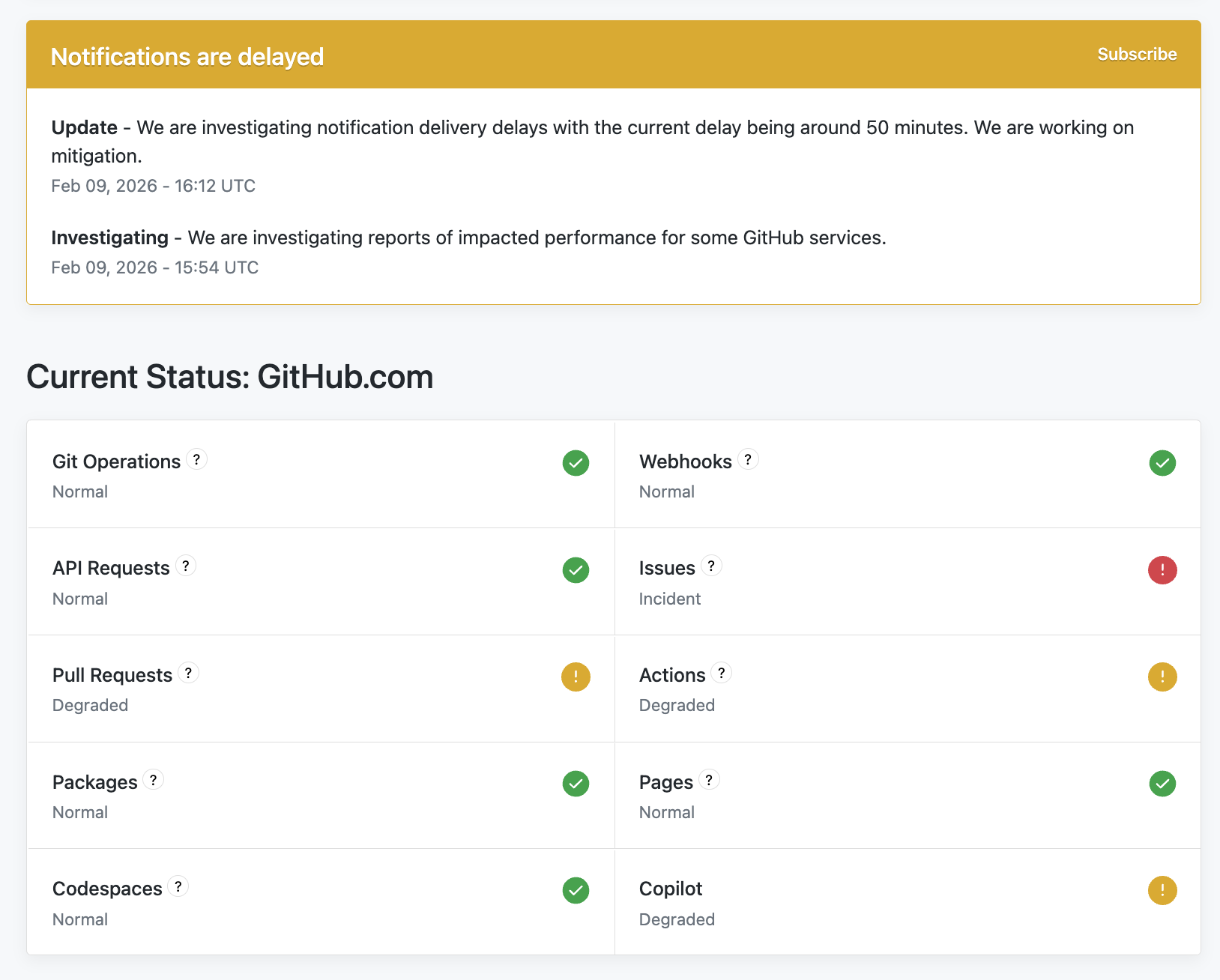
24:39 pull requests were degraded actions are degraded uh it says other things were fine but like going

24:44 to the website wouldn't work it would 503 i couldn't get clone anything so if you're having

24:49 problems this morning you know many people were python 3 14 3 is now available third maintenance

24:55 release of 3 14 so i really dislike this format i mean whoever wrote it thank you for writing it

25:01 but i do dislike this format of hey we got this new minor vert we have this release i'm going to

25:07 tell you about all the changes that have happened over the last year.

25:10 No, all I want to know is the changes in this release.

25:14 Yeah.

25:14 If I want to know the changes that have lasted over a year over a year, I could go check that

25:18 out.

25:18 But it says, here's the changes of 314 to 313.

25:21 You're like, no, well, what about the one that I had before?

25:24 Like, how is this related?

25:25 Do you know what I mean?

25:26 I know if I track it down, there's other places I can find that information, but I don't have

25:29 it on the screen.

25:30 Yeah, but you have to track it down.

25:32 Why, why shouldn't, why wouldn't it be right here?

25:34 Yeah.

25:34 What is the value of saying this like eight times before you say, you know what I mean?

25:37 Anyway, it's weird.

25:38 Just restate the changelog year over year.

25:41 But awesome.

25:42 Upgrade to this.

25:43 UV Python install 3143 --manage only.

25:50 Something like that.

25:50 Anyway, that's how you get it.

25:51 All right.

25:52 This is the wildest story.

25:53 Absolute wildest story.

25:54 And my last extra, Brian.

25:56 Okay.

25:56 This is already out of date because the number is wrong.

26:00 But Wall Street just lost $285 billion.

26:05 The valuation of companies like Salesforce, bunch of sort of offshoring,

26:11 like support team programmer companies, like, hey, we have a bunch of experts

26:17 who will like be your legal review and like write code to help you do that kind of stuff.

26:21 And so on, they just lost $285 billion because of 13 Markdown files.

26:27 And the Markdown files are short, by the way.

26:29 This is not like an Epstein type thing where like some thing has been revealed.

26:33 So we live in this like in this weird dichotomy of two bizarre viewpoints.

26:39 One, AI is a fad.

26:41 The bubble is going to burst.

26:42 And that's just not very much of an important thing.

26:45 So, you know, don't even bother learning.

26:47 It's going to crash.

26:48 It's never going to replace people.

26:49 Remember, we've replaced, we tried all these layoffs.

26:52 They try to replace people with AI.

26:53 It's going badly.

26:54 Like there's a hundred of those articles.

26:55 This article says Anthropic released something that would help Claude Code basically do better legal work.

27:03 So all of these companies lost $285 billion because it was so good.

27:08 And all it is, literally all it is, is if you go to knowledgeworkplugin.com slash legal on the Anthropic Claude Code repo,

27:15 it's just a handful of markdown files that are just pre-prompts or skills to be given to Anthropic.

27:22 How insane is that?

27:24 Yeah, that's something.

27:26 It is something.

27:27 So we live in this world where both AI is a bubble that's going to pop,

27:31 and even just a few focus prompts will destroy large companies.

27:35 So I don't know.

27:36 It's good.

27:36 We're going to see how it shakes out.

27:37 We got to go up to the name.

27:39 Like go up to the top of that article.

27:42 Sasspocalypse.

27:44 Sasspocalypse, again, on the 3rd of February 26th.

27:48 Yeah, because it's these, you know, there's a link to a Bloomberg article.

27:51 What's behind the Sasspocalypse?

27:53 I do not care about your, you know what?

27:55 Unlimited access.

27:56 There we go.

27:57 We'll go into the reader.

27:58 Yeah.

27:59 So yeah.

27:59 Anyway, you can see like, I'm not sure.

28:01 It's a good name.

28:02 It's a very good name.

28:04 Forgot some of the companies.

28:05 There are probably ones you wouldn't have heard of, but yeah, they, they, they opened

28:08 this up for like a legal specialization and then like it broke loose.

28:11 I guess hurry up and copy those files.

28:13 Exactly.

28:14 Clone those things before they get banned.

28:17 Over to you.

28:18 Well, you just, your comment about Epstein files reminded me of an extra I saw recently,

28:27 that the Bash shell manual was part of the Epstein files.

28:31 I saw that.

28:33 What?

28:33 That's bizarre.

28:35 Anyway.

28:35 Yeah, it's so bizarre.

28:37 There's whatever.

28:38 There's a bunch of stuff.

28:39 My daughter was telling me some, I don't know if this is true or not.

28:43 this is way third hand through a teenager. but that like,

28:48 that Biden was like a clone or something. Oh, geez.

28:52 Anyway. Okay. back to, back to sort of reality. Rand's, Michael Lopp, wrote,

29:01 wrote under the name of Rand's for a while. has there's a couple,

29:05 I just want to point out a couple articles. I, I found amusing recently or just helpful and interesting,

29:10 Rand's article, I Hate Fish, is not really about fish.

29:15 It's about productivity systems and also just sort of talking about productivity systems.

29:21 Because I know a lot of people kind of go down that rabbit hole of getting things done and whatever.

29:28 But there's an interesting discussion around email.

29:31 And I thought the email discussion was worth a peruse.

29:35 So good writing there.

29:38 He's also just a great author.

29:39 Cool.

29:40 I'll check it out.

29:40 And then also this one is expertise is the art of ignoring.

29:46 And this is very true.

29:47 This is from Kevin Renskers and who is apparently open for side work.

29:55 So, you know, so, but I'm not going to go through the whole thing near the end.

30:03 He had some final thoughts.

30:06 Let's see.

30:07 Oh, here, here they are.

30:08 Some lessons.

30:09 you don't need to master the language you need to master your slice which is very important and

30:14 that's that that actually used to be we used to talk about python being the language you could fit

30:19 in your head all at once and it kind of isn't now um so it's okay that you can't fit it all in there

30:26 if you don't really understand comprehensions yet don't worry about it um actually and even if it

30:33 you should but even if you could fit the whole language in your head pypi yeah pypi and even the

30:38 standard library though like i forget stuff that's in the standard library all the time so um and you

30:45 know you don't need to master your language master your slice and uh build things um and you'll you'll

30:51 provide value as you build things uh learn everything up front is wasted effort again um

30:57 knowledge decays fast um learn what the problem demands when it demands it i like to go a little

31:03 further obviously i'm kind of like you know how does that work and and uh explore a little bit

31:08 further but that's just that's my entertainment so and also expertise changes

31:14 what you pay attention to so um a senior developers don't necessarily know more facts

31:20 they're better at recognizing which details matter right now and which ones don't and that's

31:25 definitely true i think when i was all of my years as a a project lead um i think my main skill was

31:32 the ability to say yeah it's probably not actually going to happen so let's not work on that right now

31:37 um yeah so and why does that matter it's not just oh i probably should ignore that it that stops you

31:44 from going and i'm going to spend two weeks learning that framework or that angle or something

31:48 and then try and then decide i don't need it right that's a big deal yeah and actually context the

31:53 the context shift time is very real and context shift time for uh entire engineers is um is

32:01 destructive and so um the more time you can i'm talking to leaders here the more time you can um

32:08 save individual contributors from having to shift gears all the time um if you can keep them going

32:14 like you know hey i need you to start working on something new uh when are you done with the

32:20 current thing if it's like less than a day or a day or so let them finish uh you'll get more

32:24 productivity that way. So 100%. Okay. That's just, just a couple of nice articles. That's it.

32:31 Awesome. Well, you have set the stage perfectly with this context switching story, mental context

32:36 switching for the joke. And this one, I feel called out. I'm going to just tell people I feel

32:40 called out here. So I've entitled this joke, silence current side project. Oh yeah. Are you

32:46 ready? Yeah. Silence current side project. A new side project is talking. Oh, oh, it hurts. I mean,

32:55 How many people out here listening have like worked on a side project, got it 65% of the way done and like squirrel and they go off and do another thing to get 40% done, come back, get distracted, you know, just silence current side project and new side project is talking.

33:10 Yes.

33:10 Well, my existing current book that I'm writing that I need to get back to that I'd rather spend on my time on a new SaaS project right now.

33:22 Even my new projects get subverted by my other new projects.

33:25 I'm like, stop, please.

33:26 This cannot go on.

33:27 That's why I'm so thrilled about getting the command book app out because it literally went from like zero to documentation published for sale without me not being able to focus.

33:38 So it's a good deal.

33:39 Nice.

33:40 Yeah.

33:40 But in the shadow of that experience, there are many things that are still pending.

33:45 And awesome.

33:46 Well, once again, lovely to talk to you about Python and catch up.

33:50 Thanks everybody for sending in ideas and keep them coming.

33:54 And yeah, we'll talk to you all next week.

33:56 Bye everyone.


Want to go deeper? Check our projects